Why your MacBook charges slowly or drains while plugged in
A MacBook charges slowly, or even loses charge while plugged in, when the charger and cable give less power than the Mac is using. On macOS Tahoe 26.4 or later the battery menu then shows “Slow Charger”. Check the adapter’s wattage in System Information › Power, compare it with the adapter Apple recommends for your Mac, and use a cable rated for that wattage, plugged straight into the Mac.
Updated
Why it happens
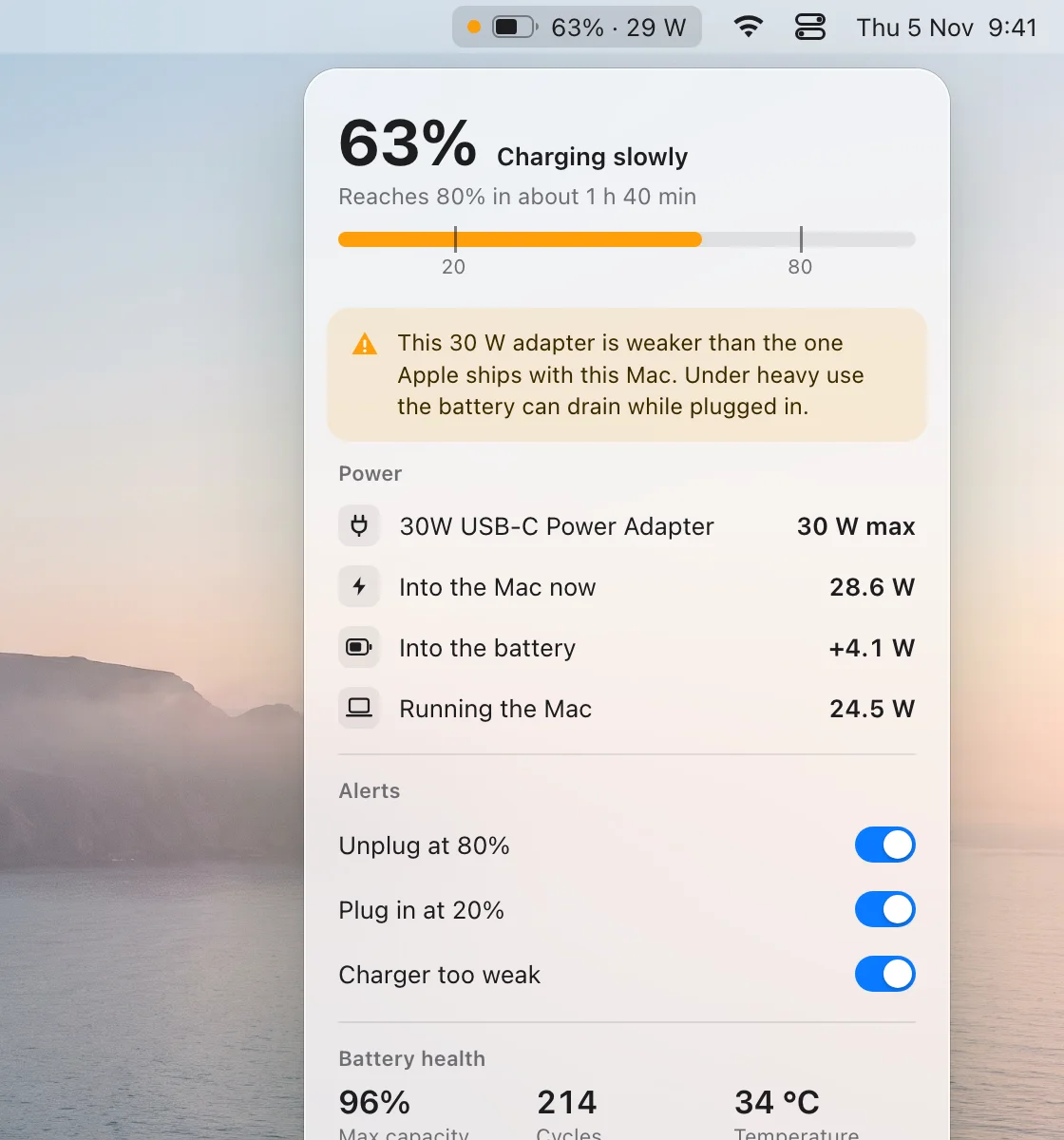
The power from the charger goes two ways: into running the Mac and into the battery. When the Mac is busy, running it takes most of the power, and a small charger has little left for the battery. If the Mac uses more than the charger gives, the rest comes from the battery and the charge goes down even though it’s plugged in.
According to Apple, on macOS Tahoe 26.4 or later “Slow Charger” appears in the battery status menu and above the Battery Level graph in Battery settings when the wattage is too low for your Mac model. To charge more quickly, use a charging solution that provides more watts.
How to check
- Hold Option, choose Apple menu › System Information, select Power and read Wattage (W) under AC Charger Information.
- Compare it with the adapter Apple recommends for your Mac (see Chargers by Mac).
- Plug the adapter straight into the Mac with a cable rated for its wattage, not through a hub or display.
Cables, hubs and displays
Many USB‑C cables carry at most 60 W, so a 96 W or 140 W adapter needs a cable rated for that much. A hub or a display that charges your Mac passes on only the power it’s designed to, which can be less than the adapter you plug into it. Apple also notes that several MacBook Air and MacBook Pro models can charge through a USB‑C port as well as MagSafe.
See it live with BatteryGuard
BatteryGuard shows the adapter, the watts going into the Mac, and how many reach the battery. When the Mac uses more than the charger gives, it marks the menu bar item and can send a notification.
Questions
Will a smaller charger damage my MacBook?
No. Apple says higher- or lower-wattage USB‑C adapters can still charge your Mac. A smaller one is just slower, and may not keep up when the Mac is busy.
Why does my MacBook lose charge while plugged in?
Because it’s using more power than the charger gives. Under heavy work the difference comes from the battery. A bigger adapter, or a cable rated for more watts, fixes it.
What does “Slow Charger” mean?
On macOS Tahoe 26.4 or later, it appears in the battery menu and in Battery settings when the charger’s wattage is too low for your Mac model.
Sources
- Charge your Mac laptop computer — Apple Support
- Use a power adapter with your Mac — Apple Support